Electrix Paint Photoshop Action: A Practical Evaluation for Digital Artists
In the evolving landscape of digital photography and graphic design, efficiency often competes with artistic control. Tools that promise to bridge this gap are frequently scrutinized by professionals who need reliable workflows without sacrificing quality. The Electrix Paint Photoshop Action is one such tool, designed to transform standard photographs into highly detailed painted effects with minimal manual intervention. This article explores the functionality, requirements, and practical applications of this action to help you determine if it aligns with your creative objectives.
Understanding the Core Functionality
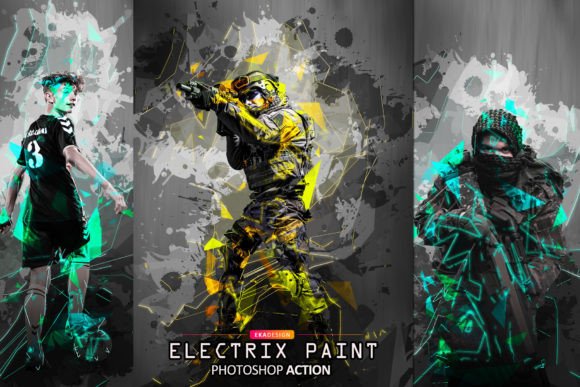
At its essence, the Electrix Paint Photoshop Action is a scripted sequence of commands within Adobe Photoshop. Its primary purpose is to automate the complex process of converting a photographic image into a stylized, painterly composition. Rather than manually applying filters, adjusting brush strokes, and layering textures—a process that can take hours—this action aims to replicate those results in a few clicks.
The appeal lies in its ability to generate intricate details that mimic traditional media. For photographers looking to expand their portfolio or designers needing unique visual assets, this tool offers a streamlined pathway to achieve a specific aesthetic. However, it is crucial to understand that "one-click" solutions are rarely magic; they are sophisticated starting points that require proper input and occasional refinement.
Technical Requirements and Compatibility
Before integrating any automated tool into your workflow, verifying compatibility is essential. The Electrix Paint Photoshop Action supports a wide range of Adobe Photoshop versions, including CS4, CS5, CS6, CC, CC2014, CC2015, CC2017, CC2018, CC2020, and CC2021. This broad compatibility ensures that users with older hardware or software licenses can still utilize the tool effectively.
A critical constraint to note is the language requirement. The action is designed exclusively for the English version of Photoshop. If your current installation uses a different language interface, the action may fail to execute correctly because it relies on specific layer names and menu commands that differ across locales. Fortunately, switching Photoshop’s interface language to English is a straightforward process. Users are encouraged to consult available video tutorials to learn how to change the language settings, ensuring seamless operation of the action without needing to reinstall the entire software suite.
Optimizing Input for Best Results
The quality of the output is directly proportional to the quality of the input. To achieve the highly detailed effects promised by the Electrix Paint Photoshop Action, users must adhere to specific resolution guidelines. It is strongly recommended to use high-resolution images, ideally around 2500px by 3500px at 300 DPI. Lower resolution images may result in pixelation or a loss of detail when the painting effects are applied, as the algorithm requires sufficient data to generate realistic brush textures.
Furthermore, the subject matter plays a significant role in the final outcome. The action performs best with portrait-oriented images featuring subjects with solid colors and clear definitions. Images with cluttered backgrounds or low contrast may not translate well into the painted style, as the action relies on distinct edges and color blocks to create depth. Selecting the right source material is perhaps the most important step in the workflow, often determining whether the result looks professional or artificial.
Workflow Efficiency and Layer Organization
One of the most significant advantages of the Electrix Paint Photoshop Action is its approach to layer management. Unlike some automated scripts that flatten images or create chaotic layer structures, this action maintains a clean and organized hierarchy. Each element of the painted effect is placed on separate layers, allowing for granular control post-execution.
This organization enables users to customize the result further. You can adjust the opacity of specific brush layers, modify blending modes, or tweak color balances without affecting the entire composition. This flexibility is vital for professionals who need to tailor the effect to match a client’s brand guidelines or personal artistic vision. The ability to quickly iterate and refine the image saves considerable time compared to building the effect from scratch.
What Is Included in the Package
When acquiring the Electrix Paint Photoshop Action, users receive a compact set of files designed to facilitate immediate use:
- Action File (.ATN): The core script that automates the painting process.
- Brushes (.ABR): Custom brush presets that contribute to the textured, hand-painted look.
- Help File (Notepad): Basic instructions and troubleshooting tips.
It is important to manage expectations regarding additional assets. Preview images and mockups are not included in the download. These are typically used for marketing purposes and do not affect the functionality of the action itself. Users should focus on the technical files provided to integrate the tool into their existing library.
Evaluating Fit: When to Use It and When to Look Elsewhere
Determining whether the Electrix Paint Photoshop Action is the right choice depends on your specific needs and workflow constraints.
Ideal Use Cases
This tool is a strong fit for photographers and digital artists who need to produce consistent painted effects across multiple images. It is particularly useful for:
- High-Volume Projects: When time is a constraint, the automation significantly reduces manual labor.
- Portrait Specialists: The action’s optimization for portrait and solid-color subjects makes it ideal for headshots and character art.
- Non-Destructive Editing: Users who value the ability to tweak individual layers will appreciate the organized structure.
Considerations and Alternatives
However, there are scenarios where alternatives may be more appropriate. If you primarily work with low-resolution web graphics or landscape photography with complex details, this action may not deliver the desired fidelity. Additionally, users who are uncomfortable switching their Photoshop interface to English may find the setup process cumbersome, although it is a one-time adjustment.
For those seeking complete artistic control without any automated presets, manual painting techniques using custom brushes might be preferable, albeit more time-consuming. Conversely, if you require real-time rendering or 3D integration, dedicated digital painting software like Corel Painter or Procreate might offer more robust feature sets, though they lack the direct photo-to-paint automation found in this Photoshop action.
Final Thoughts
The Electrix Paint Photoshop Action represents a pragmatic solution for adding artistic flair to photographic work. By balancing automation with editable layer structures, it offers a middle ground between speed and customization. Success with this tool hinges on using high-quality, appropriately composed source images and ensuring your software environment meets the language requirements. For professionals seeking to streamline their workflow while maintaining the ability to fine-tune results, this action serves as a valuable asset in the digital toolkit.