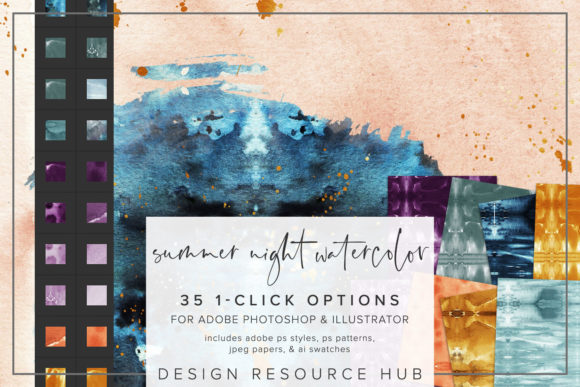
Summer Night Watercolor Photoshop Styles: A Guide to Instant Artistic Texture
In the digital design landscape, the quest for organic, hand-crafted aesthetics often clashes with the efficiency required by modern workflows. Designers frequently find themselves searching for a way to inject the warmth and fluidity of traditional media into their pixel-perfect projects without spending hours painting every element from scratch. This is where Summer Night Watercolor Photoshop Styles become an invaluable asset. This collection represents more than just a set of filters; it is a curated library of textures, gradients, and effects designed to replicate the dreamy, atmospheric quality of a summer evening captured on watercolor paper.
The Essence of Digital Watercolor Textures
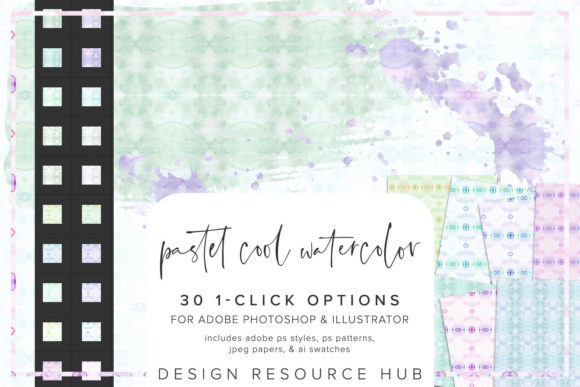
Watercolor is renowned for its unpredictability, transparency, and the way pigments bleed into the fibers of the paper. Recreating this behavior digitally can be challenging. Standard solid fills or basic gradients often look flat and artificial. The Summer Night Watercolor Photoshop Styles address this by embedding complex layer styles that mimic light diffusion, pigment pooling, and paper grain. These styles are engineered to work seamlessly within Adobe Photoshop and Adobe Illustrator, allowing creators to apply sophisticated textural depth with a single click.
The "Summer Night" theme specifically evokes a palette rich in deep indigos, soft violets, warm sunset oranges, and the subtle glow of twilight. It captures the transition between day and night, offering a mood that is both serene and vibrant. Whether you are designing a wedding invitation, a branding package for a boutique hotel, or a social media graphic for a travel blog, these styles provide an immediate emotional resonance that generic assets cannot match.
What Is Included in the Collection?
To ensure versatility across different software environments, the resource pack comes equipped with several specific file types, each serving a distinct purpose in the creative process:
- Adobe Photoshop .asl file: This contains the core style presets. When loaded, these allow you to apply complex combinations of drop shadows, inner glows, patterns, and blending modes to any selected layer instantly.
- Adobe Photoshop .pat file: These pattern files contain seamless textures derived from the watercolor washes. They are ideal for filling large areas, creating backgrounds, or adding subtle texture overlays to images.
- Adobe Illustrator .ai swatch file: For vector artists, this file ensures color consistency. It includes the specific hues found in the watercolor washes, allowing for precise coloring of vector shapes while maintaining the intended aesthetic.
- JPEG paper files (10 x 10 inches): High-resolution scans of actual watercolor paper textures. These can be used as base layers to add physical grain and imperfection to digital compositions, grounding the smooth digital elements in reality.
Streamlining Your Workflow with One-Click Application
One of the most significant advantages of using Summer Night Watercolor Photoshop Styles is the dramatic reduction in production time. Traditionally, achieving a convincing watercolor effect might involve masking, manual brush strokes, opacity adjustments, and multiple layer blending modes. With these pre-configured styles, that entire process is condensed into a single action.
The installation process is straightforward and integrates directly into your existing toolkit. In Photoshop, you simply navigate to the Styles panel menu, select "Import Styles," and load the .asl file. Similarly, patterns are imported via the Pattern Picker, and Illustrator users can access the swatches through the Swatch Library menu. Once installed, the styles appear alongside your default options, ready to be applied to text, shapes, or image masks.
This efficiency does not come at the cost of flexibility. Because these are layer-based styles rather than destructive filters, they remain fully editable. You can adjust the scale of the patterning, tweak the opacity of the effects, or change the blend mode to suit the specific lighting conditions of your project. This adaptability makes them suitable for everything from small web icons to large-format print posters.
Practical Applications and Real-World Scenarios
The utility of these styles extends far beyond simple decoration. They serve as functional tools for enhancing visual hierarchy and guiding the viewer's eye. Consider the following scenarios where Summer Night Watercolor Photoshop Styles excel:
- Typography and Branding: Applying a watercolor style to a headline font can transform a standard sans-serif typeface into something elegant and bespoke. This is particularly effective for event invitations, book covers, or luxury product packaging where a human touch is desired.
- Image Accents and Borders: Instead of a solid color border, use the style to create a textured frame around a photograph. This softens the hard edges of digital images and integrates them more naturally into a layout.
- Background Creation: By scaling the
.patpattern files, designers can create expansive, non-repeating backgrounds that provide depth without distracting from the foreground content. The seamless nature of these patterns ensures they tile perfectly regardless of the canvas size. - Social Media Content: In the fast-paced world of Instagram or Pinterest, unique visuals stand out. Using these styles to fill shapes or highlight key information in infographics can increase engagement by making the content feel more artisanal and less corporate.
Evaluating Suitability for Your Projects
While the Summer Night Watercolor Photoshop Styles offer immense value, it is important to evaluate whether they fit the specific needs of your project. These styles are best suited for designs that require a sense of warmth, nostalgia, or artistic flair. They may not be the right choice for high-tech, minimalist, or strictly corporate identities that demand sharp lines and sterile precision.
Additionally, consider the medium of your final output. While these styles render beautifully on screen, printing them requires attention to color profiles. The deep blues and purples of a "summer night" theme should be tested in CMYK mode if the project is destined for print, ensuring the colors do not shift unexpectedly. However, the inclusion of high-quality JPEG paper files helps mitigate some of these issues by providing a tangible texture reference.
Combining Styles for Maximum Impact
The true power of this resource lies in its ability to be combined with other tools. Do not limit yourself to applying a single style in isolation. Try combining the watercolor styles with custom brushes to add highlights or splatters that enhance the realism. You can also overlay the JPEG paper textures on top of the styled layers to introduce additional grain and complexity.
For example, when designing a poster for a summer music festival, you might apply the main title style to the text, use the pattern file for the background, and then manually paint over certain areas with a brush tool to simulate wet-on-wet bleeding. This hybrid approach leverages the speed of the presets while retaining the creative control of manual painting.
Conclusion: Elevating Digital Design with Organic Touch
In an era where digital perfection is the norm, the introduction of imperfect, organic textures like those found in Summer Night Watercolor Photoshop Styles offers a refreshing alternative. These tools bridge the gap between the efficiency of vector graphics and the soulful expression of traditional art. By understanding how to install, customize, and combine these assets, designers can significantly enhance the visual appeal of their work while maintaining a streamlined workflow.
Whether you are a professional designer looking to expand your asset library or a hobbyist eager to add polish to your personal projects, these styles provide a versatile foundation. They invite creativity, encourage experimentation, and ultimately help bring the magic of a summer night to life on the screen. As you explore the possibilities, remember that the best results often come from treating these presets not as final solutions, but as starting points for your own unique artistic vision.